Import JSON data
JSON (JavaScript Object Notation) is an open standard file format and data interchange format that uses human-readable text to store and transmit data objects consisting of attribute-value pairs and arrays (or other serializable values). It is a common data format with a diverse range of functionality in data interchange, including communication of web applications with servers.
Example
Let's assume we have the following schemas coming out of their respective topics
JsonStreamProfile, JsonStreamCompany, JsonStreamWork:
profile = {
        "name": str,
        "age" : int
        "mail": str,
        "address" : str,
    }

company = {
        "name" : str,
        "address" : str,
    }

works_at = {
            "person"  : str,
            "company" : str,
        }
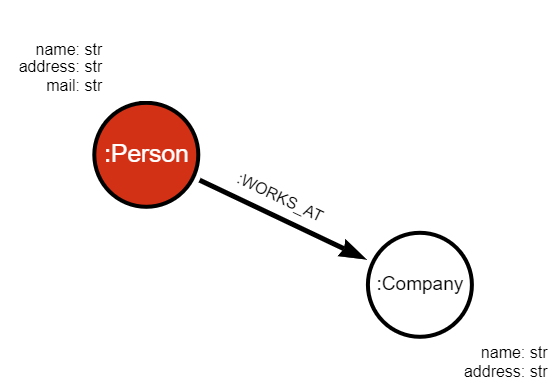
We can use the schemas to build the following graph:
Transformation modules
Before consuming data from the stream, we need to implement a transformation module that will consume JSON messages from Kafka and output Cypher queries. In order to create a transformation module, you need to:
- Create a Python module
- Save it into the Memgraph's query modules directory (default:
/usr/lib/memgraph/query_modules) - Load it into Memgraph either on startup (automatically) or by running the
CALL mg.load_allquery
Each procedure in the transformation module is responsible for one type of data
in the stream. The procedure profile_transformation can be found below:
@mgp.transformation
def profile_transformation(messages: mgp.Messages) -> mgp.Record(query = str, parameters=mgp.Nullable[mgp.Map]):
    result_queries = []

    for i in range(messages.total_messages()):
        message = messages.message_at(i)
        message_json = json.loads(message.payload())
        result_queries.append(mgp.Record (
                query=f'''CREATE (p: Profile {{ id: {message_json["id"]}, name: "{message_json["name"]}", age: ToInteger({message_json["age"]})
                address: "{message_json["address"]}", mail: "{message_json["mail"]}" }})''' ,
                parameters=None
            ))

    return result_queries
Creating the streams
To import data into Memgraph, we need to create a stream for each topic and apply our transformation module on incoming data:
CREATE STREAM JsonStreamProfile TOPICS json-stream-profiles  TRANSFORM transformation.profile_transformation;
CREATE STREAM JsonStreamCompany TOPICS json-stream-companies  TRANSFORM transformation.company_transformation;
CREATE STREAM JsonStreamWork TOPICS json-stream-work TRANSFORM transformation.works_at_transformation;
To start the streams, execute the following query:
START ALL STREAMS;
Run the following query to check if all the streams were started correctly:
SHOW STREAMS;
You can also check the node counter in Memgraph Lab (Overview tab) to see if new nodes and relationships are arriving.
Next steps
Check out the example-streaming-app on GitHub to see how Memgraph can be connected to a Kafka stream.